How to Reset a Security Light, and Whether It Should Come On in Daylight
Step-by-step resets for mains PIR security lights and solar security floodlights, whether a security light should ever come on in daylight, and what a stuck-on light does to a solar battery.
Key points
- A correctly set security light should not switch on in daylight: its light sensor (photocell) blocks the motion sensor until it gets dark.
- It may come on in daylight in test mode, when the dusk setting is turned to its maximum, when the photocell is shaded, or after a manual override switch sequence.
- Most mains PIR lights reset by switching off at the wall for about a minute; many leave manual override by being switched off and on again.
- Solar security lights reset through the mode button or remote; check the battery first, because a flat battery mimics a fault.
- In our battery calculator example, a small solar floodlight that lasts about 1.9 nights normally would run flat in well under a day if left stuck on.
Two questions come up again and again about security lights: “why is mine on in the middle of the day?” and “how do I reset it?”. They are linked. Most daytime triggering comes from a setting or a mode that a reset will clear, and most “it has stopped working” calls are a light stuck in a mode the owner did not mean to choose. This guide answers both, for mains PIR lights and for solar security floodlights.
Should a security light come on in daylight?
No, not when it is set up properly. A motion-sensing security light has two sensors:
- A light sensor (photocell) that measures how bright it is around the fitting.
- A motion sensor (PIR or microwave) that detects movement.
The light sensor acts as a gate. While it is bright, the motion sensor’s signal is ignored. Once it gets darker than the set level, motion switches the lamp on for the set time.
So when a security light comes on in daylight, something is overriding that gate:
| Cause | How to recognise it | Fix |
|---|---|---|
| Test mode | Light triggers by day for a few seconds only | Switch the time dial out of “test” |
| Lux / dusk dial at maximum (“day” or sun symbol) | Light triggers in bright daylight | Turn the dial towards the moon symbol |
| Photocell shaded | Fitting under a deep eave or in a dark corner | Move it, or lower the lux setting |
| Manual override | Light stays on continuously, day and night | Reset (see below) |
| Faulty photocell or sensor | Triggers at random, day or night | Replace the sensor or fitting |
Our security light sensor settings guide explains the time, lux and sensitivity dials in detail.
How to reset a mains security light
Most mains PIR security lights reset in one of two ways. Check the manual for your model, because sequences vary.
Power reset (clears faults and override on most models):
- Switch the light off at the wall switch or the breaker.
- Wait about 60 seconds, so the sensor’s electronics discharge fully.
- Switch it back on.
- Many lights stay on for a warm-up period of up to a minute or so while the sensor settles, then switch off.
- Walk through the detection area after dark (or in test mode) to confirm it triggers.
Manual override (and how to leave it): many models switch to “always on” when the wall switch is flicked off and on again quickly, often within a couple of seconds. That is useful for working outside, but it is also how many lights end up stuck on by accident. To leave override, switch off for about a minute and back on, which returns the light to automatic mode.
If the light still misbehaves after a reset:
- Check that nothing moves in the detection area: trees, flags, passing cars or a heating vent can trigger it.
- Turn the sensitivity down and re-aim the sensor head slightly downwards.
- Check for water inside the sensor lens after rain.
How to reset a solar security light
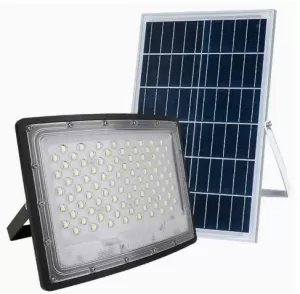
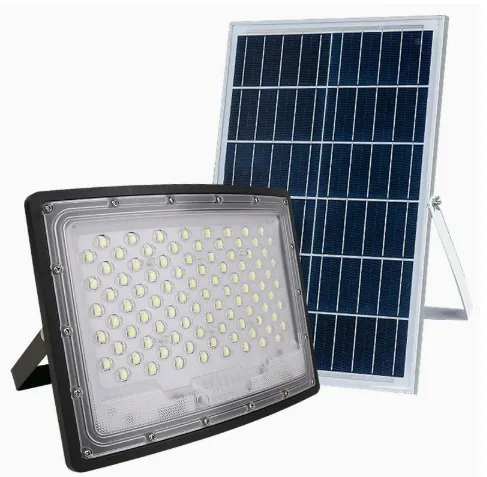
Solar security floodlights, like our solar flood light with separate panel, are controlled by a mode button on the lamp or a remote. They have a 6 V panel, a 3.2 V lithium battery of 9.6–80 Wh depending on the housing, and light control with timer and remote settings.
- Switch it off with the button or remote.
- Leave the panel in full sun for a day, so the battery is charged before you judge anything.
- Check the panel connection. On split models, a loose plug on the 5 m cable between panel and lamp is a common cause of “no charge”.
- Switch on in the mode you want: dusk-to-dawn, timer or motion.
- Test at dusk. Cover the panel briefly if you want to see it switch on sooner.
If it still fails after a full day of sun, the battery or the controller is likely at fault.
What a stuck-on light does to a solar battery
A mains light stuck on wastes electricity. A solar light stuck on runs out of energy, and then looks broken.
Take a small solar floodlight running at 3 W, with a 10 Ah, 3.2 V LiFePO4 battery and a 10 W panel. Our battery autonomy calculator, with 4 hours at full power and 6 hours at 30 % each night, 4.5 peak sun hours and a PWM controller, gives:
- Usable battery: 28.8 Wh
- Nightly use: about 19.3 Wh
- Daily solar input: about 27 Wh, a surplus of about 7.7 Wh on sunny days
- About 1.9 nights of autonomy if the sun fails
Open the example and enter your own light’s figures.
Now suppose the light is stuck on at full power, day and night. It uses 3 W × 24 h ÷ 0.9 ≈ 80 Wh a day against about 27 Wh of solar input. The battery loses about 53 Wh a day, so a full 28.8 Wh battery is empty in roughly half a day. After that the light works only briefly each evening on whatever the panel put in. The owner sees “dim and short”, reads it as a dead battery, and buys a new one, when the real problem was the mode.
Prevent it happening again
- Label the wall switch for mains security lights, so nobody flicks it into override.
- Use motion mode on solar lights where constant light is not needed; our motion sensor flood lights guide compares the modes.
- Keep the photocell clear of eaves, plants and other lights shining on it.
- Decide whether the light should be on all night or on motion. Our article on whether security lights should stay on at night compares running cost and deterrence.
- For mains floodlights on a site, consider a separate photocell and contactor instead of sensors on each fitting. Our slim LED flood light can be paired with a photocell or a sensor.
Quick troubleshooting
| Symptom | First check |
|---|---|
| On in daylight, briefly | Test mode or lux dial |
| On day and night | Manual override; power reset |
| Never comes on | Lux dial too low, sensor aimed wrong, no power or flat solar battery |
| Comes on at night with no one there | Moving trees, animals, traffic; lower sensitivity |
| Solar light dim and short | Battery not charging: panel shaded, connector loose, or light left in “on” mode |
What to send us
If you are buying security floodlights for a site, send the area, mounting heights, whether mains is available and the mode you want (all night or motion). We will suggest the fittings and, for solar, size the battery and panel for your location.
Sources
Frequently asked questions
Do security lights come on in daylight?
Not when they are set correctly. The built-in light sensor keeps the motion sensor inactive while it is light. A security light that triggers in daylight is usually in test mode, has its lux or dusk setting turned to maximum, or has a shaded or faulty photocell.
How do I reset my motion sensor security light?
On most mains models, switch it off at the wall switch or breaker for about a minute, then switch it back on. The light may stay on for a short warm-up period, then return to automatic mode. Check the manual, because some models use a quick off-on sequence for manual override.
Why is my security light stuck on?
Common causes are manual override mode (often triggered by flicking the switch off and on), the time setting turned to maximum, a sensor pointed at a moving object such as a tree or road, or a failed sensor. A reset and then a walk test usually show which.
How do I reset a solar security light?
Switch it off with its mode button or remote, leave the panel in sun for a day, then switch it back on in the mode you want. If it still does not work, check the panel cable connection and that the battery is not flat or failed.
How do I test a security light during the day?
Use test mode if it has one, which ignores daylight for a short time, or cover the light sensor with tape and walk through the detection area. Remove the tape afterwards.